Squinch - Architecture Diagrams Your AI Agent Can Draw
Every project I’ve worked on has had The Diagram. You know the one. Somebody spent an afternoon lining up boxes in a drawing tool, it got pasted into a wiki, and six months later it’s wrong in three places and nobody remembers where the original file is. I’ve been that somebody more than once.
There are a ton of tools out there for this already: drag-and-drop editors, text-based diagram languages, full-blown architecture modeling tools. I’ve used a lot of them, and they’re all good at what they do. But I always found myself looking for something else. I wanted the diagram to live in git next to the code. I wanted it to look like something I’d actually put in a design review. And lately I wanted my AI coding agent, which already knows the architecture, to just draw it for me. I never found one tool that did all of that, so I built it. Enter Squinch.
Built for AI agents first
Most diagrams-as-code tools were designed for humans to write, and AI got bolted on later. Squinch went the other way around. It ships as a skill for your AI coding agent (Claude Code, Codex, Cursor, whatever you use), and the language was designed so an LLM can write it fluently. When something’s wrong, squinch check doesn’t just say “syntax error.” It tells you where the problem is, what’s wrong, and usually how to fix it (did you mean ...?), and it can do all that in JSON. So the agent writes the model, checks it, fixes what the checker flags, and renders it. In practice I describe the system in a paragraph and get back a diagram I don’t have to redraw.

One model, every altitude
This is the part I’m most excited about. You write the model once, and every system automatically gets its own zoomable view. The landscape shows each system as a card, and clicking one opens up its internals while its neighbors stay on screen as muted context. You can also tag things (say #pci) and get a view that’s just the PCI stuff for an auditor. All the views come from the same source, so they can NOT disagree with each other.
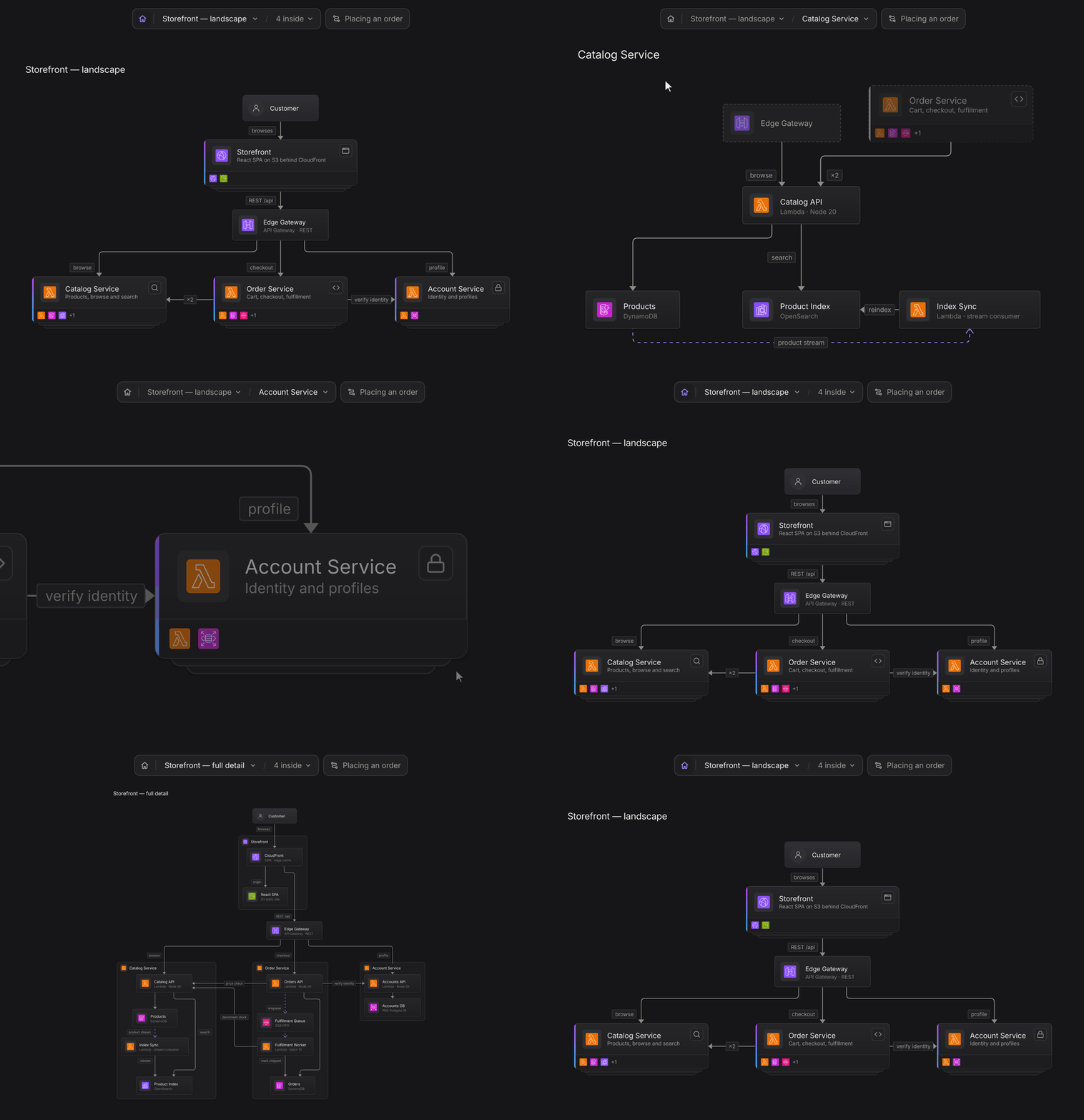
Here’s a small example:
system orders "Orders API" {
  api    = aws/api-gateway "API Gateway"
  save   = aws/lambda      "Save Order"
  db     = aws/dynamodb    "Orders Table" datastore
  notify = sys/webhook     "Notify Webhook" external

  api -> save
  save -> db "put item"
  save -> notify "order created" { animate: comet }
}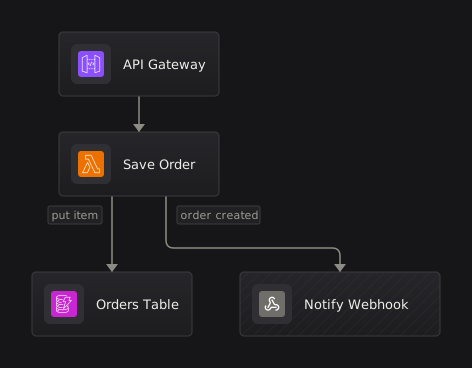
That’s it! No boxes to drag, you get real AWS icons, and that little dot riding the webhook line is just animate: comet.
It actually looks good
I wanted these to look like something you’d be proud to put in front of people, not grey boxes with labels on them. Squinch ships with about 1,350 real vendor icons (AWS, Azure, Google Cloud, Kubernetes, plus a big set of product logos). Dark mode is designed rather than just inverted. You can export SVG, PNG, or one interactive HTML file with click-to-zoom and a presentation mode that works without a server.
It lives in git
Rendering is deterministic, so the same input always produces the same output. The .squinch file sits next to the code it describes, and a GitHub Action fails the build when a committed diagram has gone stale. My favorite part is that squinch diff tells reviewers what changed in the architecture (“edge added: checkout → fraud”) instead of showing a thousand lines of SVG path data.
Why “Squinch”?
A squinch is the little corner arch that lets a round dome sit on a square room. It’s the piece of architecture that makes mismatched structures fit together, which felt about right. =)
Summary
So yeah, if you’ve ever been stuck maintaining The Diagram, give it a try. It’s still pre-alpha, so expect some rough edges. Getting started is one command (npx squinch skill), and then you just ask your AI agent for a diagram. Check out squinch.cc, or try it in the playground without installing anything. Enjoy!